

Application Documentation
A comprehensive guide to K&A Notes functionality, workflows, and features.
Application Overview
K&A Notes is a modern productivity ecosystem designed to bridge the gap between note-taking and professional collaboration. Built with a focus on speed, aesthetics, and utility, it allows you to capture ideas instantly, host or schedule meetings with seamless Google Calendar integration, and share your work with team members in real-time.
Getting Started
Authentication
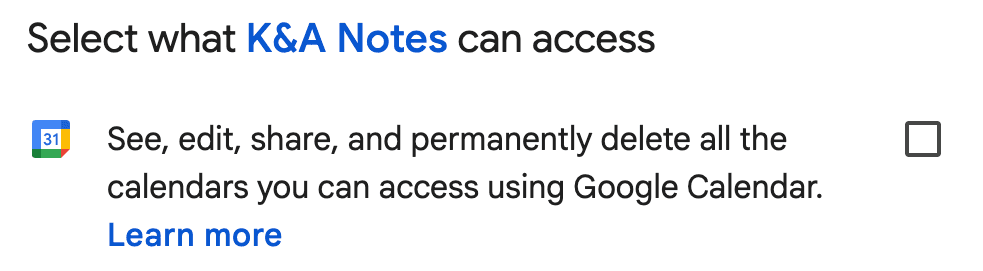
We use Google OAuth 2.0 for secure, single-sign-on access. This ensures your data is protected by Google's world-class security while enabling deep integration with your calendar and contacts.
Mandatory Permission: During sign-in, ensure you check the box to grant K&A Notes permission to manage your calendar. This is required for meeting synchronization.
Notes & Rich Text Editor
Creating a Note
Click the Take a note input field on your dashboard. Type a title and press Enter or click the plus icon to start writing.
The Editor Toolbar Guide
You never have to click "Save". Every keystroke is synchronized to our servers instantly, ensuring you never lose a word of your work.
Meetings & Event Management
Scheduling a Meeting
Click the **"Instant Meeting"** button to open the scheduler. You can define the title, date, time, and invite participants by email.
- Calendar SyncEvents are automatically synced to your Google Calendar.
- Email InvitesParticipants receive formatted emails with direct links.
- RemindersSet custom durations for browser and email reminders.
Managing Your Meetings
Profile & Security
Manage your identity and account security via the **Profile Settings** modal.
Update your display name at any time. This name is used on all shared notes and meeting invites.
Even with Google Login, you can set a secondary password for direct email/password access later.
Keyboard Shortcuts
| Action | Shortcut |
|---|---|
| Bold Text | Cmd/Ctrl + B |
| Italicize Text | Cmd/Ctrl + I |
| Underline Text | Cmd/Ctrl + U |
| Bullet List | Cmd/Ctrl + Shift + 8 |
| Ordered List | Cmd/Ctrl + Shift + 7 |
| Blockquote | Cmd/Ctrl + Shift + B |
| Task List | Cmd/Ctrl + Shift + 9 |
| Undo | Cmd/Ctrl + Z |
| Redo | Cmd/Ctrl + Y |
FAQs
My meeting isn't appearing in Google Calendar?
Instant meeting link not generated?
- Click on Go to Google Meet button to generate instant meeting link. Copy that link to share with others. or
- Click on Create a Jitsi link automatically button to generate instant meeting link. Copy that link to share with others.
Can't able to delete a meeting?
How do I delete a shared note?
Can I use K&A Notes offline?
Application showing Unauthorize?
- Click on Profile Icon/Image.
- Click on Sign Out.
- Login again.